





A full-page capture photographs the whole document at once, but a browser only loads lazy content near the part of the page a visitor is looking at. Images with loading="lazy" and sections filled in by an IntersectionObserver stay as placeholders, so the top of the image is right and the rest is grey boxes.
See it on a test page
The test page below has six sections, and each fills in only once it is on screen. Download it and send it as html to see both results for yourself.
- lazy-page.html: six sections that load as they come into view, with no network requests, so the result is the same every time
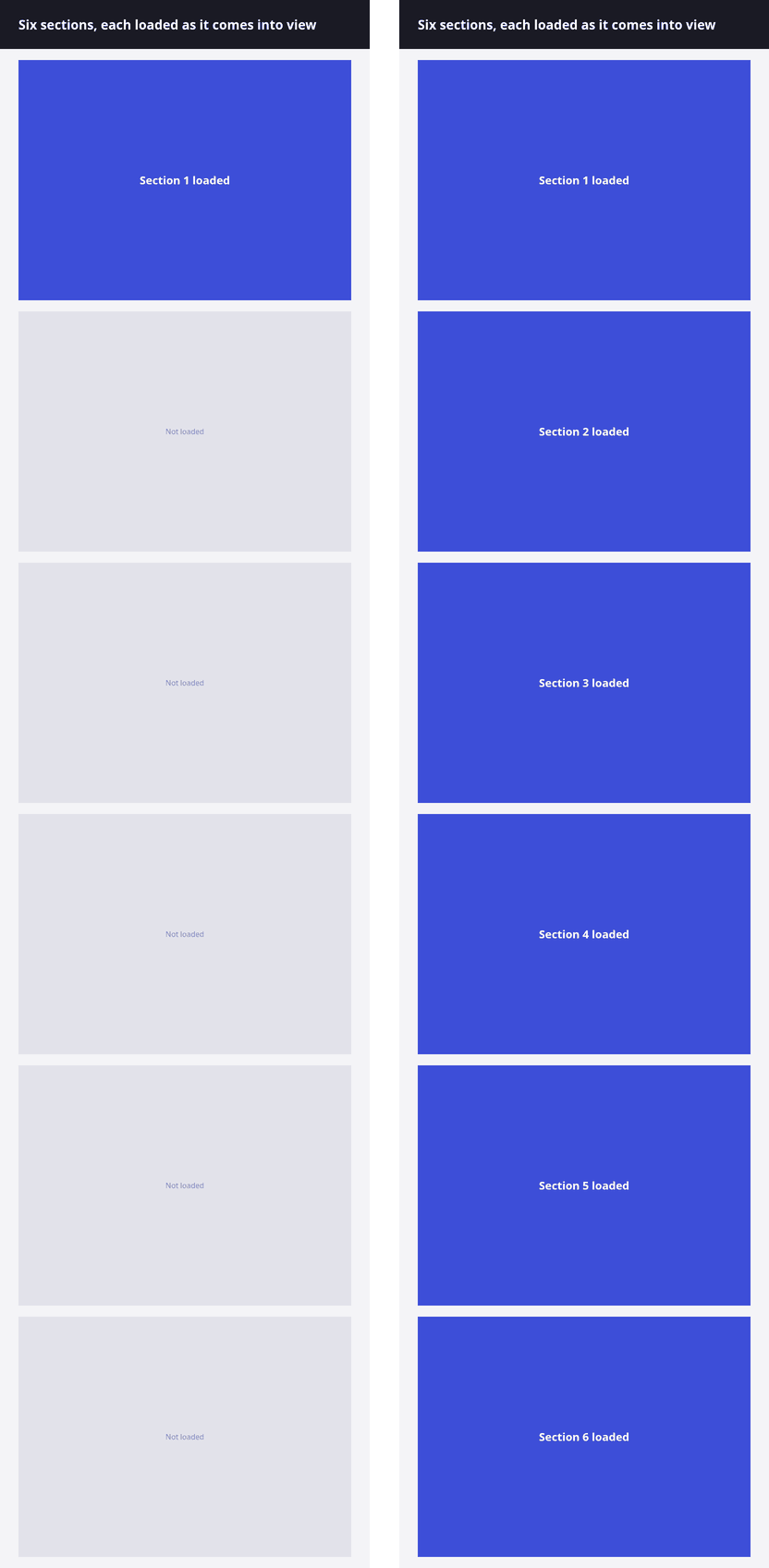
Ask for the page to be scrolled first
jq -n --rawfile html lazy-page.html '{
  html: $html,
  width: 800,
  height: 600,
  full_page: true,
  full_page_readiness: "scroll"
}' > request.json

curl -sS https://api.ironfang.com/render/v1/screenshot \
  -H "Authorization: Bearer $IRONFANG_API_KEY" \
  -H "Content-Type: application/json" \
  --data-binary @request.json \
  -D headers.txt -o page.png

grep -i '^x-ironfang-warnings' headers.txt
With full_page_readiness set to scroll, the page is walked down a viewport at a time before the capture. Each step waits up to 750 ms for the images it exposed; the walk then returns to the top and waits up to 2 seconds for the images inside the capture. The whole pass takes at most 10 seconds and 60 steps.
The capture is still taken from the top, so a sticky header appears once, at the top, rather than wherever the walk left it.
Read the warnings
A walk that runs short is not a failure: the capture succeeds and the X-Ironfang-Warnings header says what was incomplete. A job carries the same in diagnostics.readiness.
- scroll_budget_exhausted: the walk ran out of time or steps before the bottom of the capture.
- images_incomplete: images inside the capture were still loading when the wait ended.
- images_broken: images inside the capture failed to load. That is the page, captured as it is.
- height_capped: the page was taller than full_page_max_height and the capture was cut there.
When scrolling is not enough
Some content waits for something other than the scroll position: a slow API call, or a list that loads after the last section. Wait for an element that only exists once everything is in, and add a success rule so a blank capture is refused rather than delivered.
{
  "url": "https://example.com/catalogue",
  "full_page": true,
  "full_page_readiness": "scroll",
  "wait_for_selector": "#catalogue-end",
  "success_rules": { "fail_on_blank": true }
}Next
- Full page screenshot API: what a full-page capture does and what it costs
- Screenshot request reference: full_page_readiness, success_rules and every other field
- Capture a long page as a phone sees it
- Capture screenshots without ads or cookie banners
- Full API reference