





If an invoice already has an HTML web view, the same markup and styles can be used for the PDF. This keeps the browser and PDF versions aligned without maintaining a separate layout. Ironfang Render prints it in Chromium, applying your print styles, and returns the finished PDF.
Download the working example
- invoice.html: a one-page A4 invoice: self-contained HTML and CSS, no external fonts or images
- invoice-multipage.html: the same design with 48 lines, which runs to four pages
- request.json: the exact request body for invoice.html, built with the command below
- invoice.pdf: the PDF that request produces, one page
- invoice-multipage.pdf: the multipage template rendered with the same options, four pages
- Open this template in the free HTML to PDF converter: convert it in the browser with no API key; the converter does not add the page-number footer, and its PDFs carry a small Ironfang Render mark
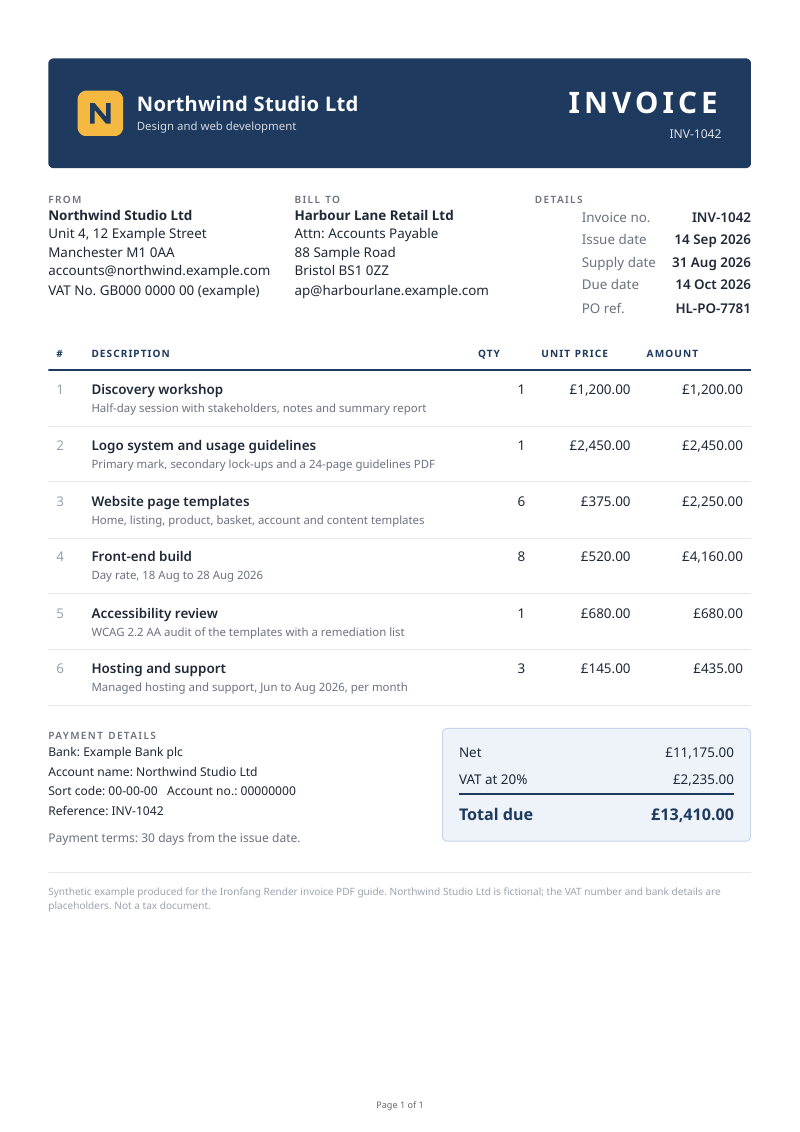
Adapt the template
- Seller and buyer: the three blocks in section.parties hold the names, addresses, VAT number and invoice details. Replace the text; the layout does not depend on it.
- Lines: each tr in tbody is one line item, with the description and a short detail line in td.desc. Add or remove rows freely; the multipage template shows 48.
- Totals: the template does not calculate anything. Work out line amounts, VAT and the total in your own code with decimal arithmetic, and write the results in.
- Branding: the header band colour is #1e3a5f and the logo is an inline SVG. Replace both, keeping the logo inline or as a data URI so it needs no fetch.
A PDF like this is a picture of an invoice for people to read. Where a buyer or a country requires a structured electronic invoice, that is a separate XML document, such as a Peppol BIS Billing 3 invoice: see the Peppol XML invoice example for one, explained field by field.
- Peppol XML invoice example: a complete structured invoice that passes validation
Render it
jq builds the request body from the template and escapes the HTML into a JSON string, so the markup never needs hand-escaping. Then post it with your key from the IRONFANG_API_KEY environment variable.
export IRONFANG_API_KEY="if_live_..."

jq -n --rawfile html invoice.html '{
  html: $html,
  paper_format: "a4",
  print_background: true,
  margin: { top: 0.6, right: 0.5, bottom: 0.8, left: 0.5 },
  header_html: "<span></span>",
  footer_html: "<div style=\"font-size:9px;width:100%;text-align:center;color:#666;font-family:sans-serif\">Page <span class=\"pageNumber\"></span> of <span class=\"totalPages\"></span></div>"
}' > request.json

curl -sS https://api.ironfang.com/render/v1/pdf \
  -H "Authorization: Bearer $IRONFANG_API_KEY" \
  -H "Content-Type: application/json" \
  --data-binary @request.json \
  -o invoice.pdf \
  -w '%{http_code} %{content_type}\n'
A 200 with application/pdf means invoice.pdf is the document. Any other status is a JSON error, {"error": {"code", "message"}}, written to the same file: read it rather than opening it as a PDF. Each PDF uses two credits, and a failed render is refunded.
Page size, margins and page numbers
paper_format takes a3, a4, a5, letter, legal or tabloid; without it the page is Letter. Margins are in inches, per side. The footer is drawn inside the bottom margin, so leave room for it: 0.8 inches here keeps the page number clear of the last row.
Chromium fills the pageNumber, totalPages, date, title and url classes inside header and footer templates. Sending either template turns both on, so a request with only a footer also needs an empty header_html, as above; otherwise Chromium prints its default date and page title across the top of every page.
Long invoices across pages
Three rules in the template carry a long invoice across pages. The column headings repeat at the top of every page, a line item is never split between pages, and the totals stay together with the payment details. In invoice-multipage.pdf the headings open all four pages, the long five-line descriptions stay whole, and the totals land together on page four.
From invoice-multipage.html.
table.items thead { display: table-header-group; } /* repeat the headings */
table.items tr { break-inside: avoid; }            /* keep each line whole */
.end, .totals { break-inside: avoid; }             /* totals with payment details */
A single row taller than a page still has to split. Keep line descriptions to a few lines, and put long terms in a separate section after the totals.
Backgrounds, fonts and images
- Backgrounds: browsers leave background colours and images out of print by default. Send print_background: true, and add print-color-adjust: exact to the elements that carry them, such as a branded header band or a shaded totals box.
- Fonts: the renderer has its own installed fonts, not yours. For an exact match, load your font with @font-face from a public URL or a data URI, and set wait_until to networkidle so it has arrived before the page prints. The example uses a system font stack, which is why it needs no fetch at all.
- Images: an inline SVG or a data URI prints with no request. An image by URL must be reachable from the public internet.
Fill the template safely
Customer names, addresses and line descriptions come from your data, and one stray angle bracket can break the layout or inject markup. Escape every value as you put it into the HTML, exactly as you would for a web page.
Python, with the standard library.
from html import escape

row = (
    f"<tr><td>{escape(item.description)}</td>"
    f"<td>{item.quantity}</td><td>{item.unit_price:,.2f}</td></tr>"
)
Troubleshooting
- A date and the page title appear at the top of each page: the request has footer_html but no header_html. Add "header_html": "<span></span>".
- The page number overlaps the last row: the bottom margin is too small for the footer. Increase margin.bottom.
- Colours or the header band are missing: set print_background to true.
- The right-hand edge is cut off: something has a fixed width wider than the paper. Use percentages or max-width: 100% for the page wrapper and tables.
- A line item is split across two pages: add break-inside: avoid to tr, and check that no single row is taller than a page.
- The PDF opens as an error: the response was JSON, not a PDF. Check the status code the curl command prints.
Credit usage
Each PDF uses two credits, and failed renders are refunded. PDFs are not cached: every request renders the document afresh, so keep the PDF you issue and serve repeat downloads from your copy rather than rendering it again.
Next
- Free HTML to PDF converter: this template, loaded and ready to convert without a key
- Invoice PDF API: billing runs as batches, delivery to your own S3 bucket and webhooks
- HTML to PDF API: statements, reports and other documents from HTML
- PDF request reference: every field, its type and its limits
- Convert HTML to PDF in Python
- Generate Open Graph images from reusable templates
- Full API reference